Showing posts with label ADF UI. Show all posts

Saturday, October 10, 2015

Clear ADF Form after Commit a new record


In this example I'll show you how to clear ADF form after Commite a new Row


Let us start :

1- Create new VO from DepartmentEO  (DepartmentInsertOnly)
2- Open Tuning  tab from VO and check option No Rows (Inserting new Rows Only)


3- Create new VO from DepartmentEO to preview Data (DepartmentReadOnly)
4- Shuttle these two VOs as instances in Data Model 


5- Create new JSF page (InsertDepartmentpage)
6- Drag DepartmentInsertOnly from Data control panel into page as adf Form .
7- Drag Commit and CreateInsert Operations into page .
8- Drag DepartmentReadOnly  from Data control as read only adf table.
9- Double click on commit button to create custom method inside a managed bean , to commit new row and refresh view object after clear cache.


10- Add this code under this method


 public String commitAction() {     
   BindingContainer bindings = getBindings();
        OperationBinding operationBinding = bindings.getOperationBinding("Commit");
        Object result = operationBinding.execute();
        refreshVO("DepartmentsViewInsertOnly"); // Iterator Name
        
         if (!operationBinding.getErrors().isEmpty()) {
            return null;
        }
        
        return null;
    }

   // refresh View Object
    private void refreshVO(String vo){

            DCIteratorBinding irt = (DCIteratorBinding)getBindings().get(vo);
            ViewObjectImpl view = (ViewObjectImpl)irt.getViewObject();
            view.clearCache();
            view.executeQuery();

        }


- Now please run and test

       As you see ADF Form still blank with now data , becuase it is for insert new row only


      Enter you data and press commit button
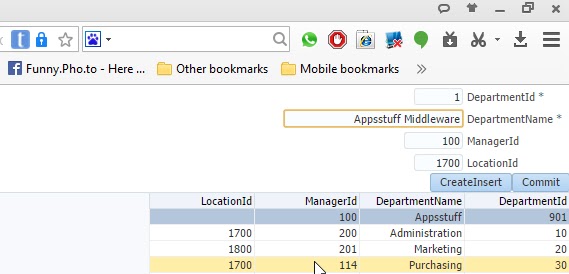


      ADF will clear VO Cache and re-execute . 


Saturday, May 30, 2015


ADF - Create Detail with Multiple-Masters Tables

In this Demo I'll discuss with you , how to create One detail view object with two or more masters tables ?
only one trick will resolve the issue !!

Friday, May 29, 2015

ADF – selected value from SelectOneChoice  Components


In this article I’ll discuss how to get Values from SelecrtOneChoise Component rather than index
Before we Start . you should know the Problem.

Case :
We have jspx page contains SelectOneChoise Component depend on List of value from DepartmentVO .
 We need to return its value when user change the value of this Component.
The value must return DepartmentVO attributes .new and old value .

Problem :
When you try to get value direct with EL , The result will return index of current row for DepartmentVO (List of Value ),  when we need return real data .


Solution :
1-      Create new jspx page .
2-      Drag EmployeesVO as form .
3-      Create two inputText  for new Value and Two inputText for old Value .
4-      Add custom code in backbean , ValueChangeListener property
5-      Set partial trigger property reference to soc1 (SelectOnceChoise Component)
6-      Set autosubmit propriety for soc1


    public void soc1_valueChangeListener(ValueChangeEvent valueChangeEvent) {
        BindingContainer bindings = BindingContext.getCurrent().getCurrentBindingsEntry();
        JUCtrlListBinding listBinding =(JUCtrlListBinding)bindings.get("DepartmentId");
        Row selectedValue = (Row) listBinding.getSelectedValue();
        Object nDeptid = selectedValue.getAttribute("DepartmentName") ;
        Object nDeptname = selectedValue.getAttribute("DepartmentId") ;
        Object nLocation = selectedValue.getAttribute("LocationId") ;
        it10.setValue(nDeptid);
        it11.setValue(nDeptname);

        int ind = Integer.parseInt(valueChangeEvent.getNewValue().toString()) ;
        listBinding.setSelectedIndex(ind);
        selectedValue = (Row) listBinding.getSelectedValue();
        Object oDeptid = selectedValue.getAttribute("DepartmentName") ;
        Object oDeptname = selectedValue.getAttribute("DepartmentId") ;
        Object oLocation = selectedValue.getAttribute("LocationId") ;       
        it12.setValue(oDeptid);
        it13.setValue(oDeptname);
    }


O racle  SQL WITH Clause         subquery factoring     or         Materializing   subqueries                                 (Sim...